As i had promised in my last blog. Here are some screenshots of what is happening with the Open Source IDE that i have started writing. Currently i am looking at tools and libraries to generate swf files from this IDE.


So its been a long long time, since i had updated my blog. What to do, i was too busy doing nothing worthwhile all this while. The latest update at my end is that i have started writing an Alternative for the Flash IDE. I always felt that its high time people need to do something for an IDE on Linux, but realized i am also one among the people so it is my responsibility too to see that someone does something.
Coming to the subject, the Flash alternative IDE i am talking about is written using C++ and QT4 framework. Though i have knowledge about C++ and the syntax, but never had any working experience on the same. Initially felt a bit scary about apprehensions like will i able to complete it? or is it a reality that i am pursuing, but i made to myself that i will never have these thoughts and will start on my dream. C# was my initial choice to write this open source IDE, cheating myself that i can make this work on Linux using Mono. But later on things were proved to be wrong, as i got stuck with the flood fill algorithm. Then faced myself with the truth and decided that though C++ might look primitive after working on Actionscript, but still it is the powerful element that has the ability to create (I consider this as "Brahma"). C# was wonderful for me to work with because of its language structure which i felt comfortable after having worked in complete oops elements like Actionscript and Java. But at later stages had some trouble and finally had to take digest the fact and fear of working in C++. But the results were really fruitful. I (have / am) (learnt / learning) a lot of C++ working on this project.
The current number to denote the progress of work that has happened would look something like (15 / 100). Though a lot of time has been invested to achieve this minimal value, I would say from what has been observed is that the speed is getting picked up on an exponential fashion. Nowadays i have started investing more time on it. One good reason for the increased time being spent on this is solely due to the IDE i am using to create this application. As i said in the beginning about my intention of having an Open Source Flash IDE for Open Source platforms like Linux, this application is now being developed using KDevelop on Linux GNOME environment. The story behind using Linux to develop this OS Flash IDE using Linux has only one reason, which is my Windows Desktop recently crashed and the hard disk got filled with Viruses. I felt sick trying to repair this and decided i will go for Linux and installed it.
This is the story so far and will soon come back with screenshots to update the progress.
Meanwhile anybody out there interested in the development of this project, please get in touch with me at ashok_srinivasan2002@yahoo.com or leave a comment in this blog with your mail id and i will get in touch with you.
Regards,
Ashok Srinivasan.
I am currently playing around with Flash Media Server based applications using RED 5(Amazing tool I would say.) and encountered a very very strange Bug. When I tried to record voice over the web using my application url I found that a FLV file is being created but it does not appear to have a valid file size. I have been struggling over this from changing my code from AS3 - AS2 and vice versa but with no luck. But one thing that constantly came to my notice during this struggle was that in other applications (that came along with red 5 server as demo files ) whenever I tried to record my voice I was able to see a setting window invoked by the flash player asking for user's confirmation to allow data to be recorded. And in my application whenever i clicked record this setting window never showed. Maybe it was my bad luck that stopped me from thinking or analyzing in this line of thought i was busy thinking about other problems which resulted in failure to make my application work correctly until today morning when tried the red 5 applications native demo swf file to record my voice using my app's url. Amazingly my voice was starting to be recorded and i could see the flv's file size constantly increasing with voice data being stored.
I did not know why or how it occured to me but i once again opened my own application fla file and changed its stage size to 250 x 250 then published it to test.
Guess what happened ??? when i connected to the RED 5 server and clicked the record button i was able to see the flash setting window being opened asking for the request to allow my url to record data. And happily saw the size of flv file increasing being saved in my streams folder.
Concluding i guess it was the stage size that was giving problem all this time. My guess is that if the stage size needs to be big enough to accommodate the flash player setting box to be shown (in my case i found it to work perfectly with 250 x 250 px).
Regards,
Ashok Srinivasan.
Well when it comes to actionscript projects, one stops to think and wonder how do I start ? Wow that's a very elementary question but also it is very important and fundamental.
One approach is to open flash IDE and start writing the code like hell and pride yourself with the speed with which you complete, and end up being the most most happiest person in this whole world. Days pass by and one day something new to be added turns up for the happiest project you did once before only to make you feel annoyed and irritated at the end of the day. Remember writing code would be like getting married to a girl due to infatuation where you enjoy the initial phase but regret later. Whereas on the contrary if things had been organized and are in the right places with proper framework will result in something that can be better maintained and a good rapport will always exist between you and your code(wife). Forget about maintaining it yourself but anyone who takes it later will load you with lot's of blessings (in real life scenario this does not apply to my example).
Have you decided about your attitude towards writing code ? If yes please proceed further, else you always have time to take a decision and make a choice out of yourself.
Whatever I am going to explain hereafter will strongly pertain to AS3 and still will be applicable to AS2 also. I will not be explaining about frameworks or design patterns for I myself lack a lot in that area and lot to be learned is still pending. Instead what you will see in this tutorial is some of the techniques I have been following till now in my ActionScript career.
The folder Architecture :::::::::::::::::::
Before you start with a project ensure to maintain proper folder architecture. A good developer will always do this. Ensure that you have the following folders for sure in your project folder.
com - Folder consisting of your class files.
src - Folder containing your source FLA file(s).
bin - Contains the output file (subfolder's Release || Debug).
assets - Contains the graphic assets required for designing your flash project.
includes (If as2 ) - Folder containing the necessary include files (Generally there is only main.as).
Folder "com" explained
Usually this folder contains a folder named "yourcompany" which in turn will contain subfolder named "yourprojectname" and subfolders with the following names.
main - The main controlling class file Main.as is present here.
display - Class files used for linking to display objects or referenced via linkage id are created here.
components - Class files used for your custom components are created here. (example : CustomScrollbar.as etc., )
utils - Class files that are written to do some utility operations (example : MyMath.as, Logging.as etc.,)
With this you will now be able to sort out and will be able to design your application framework in an even better way.
Some example classes are written below for your better understanding.
Display class example :
package com.yourcompany.yourprojectname.display
{
public class YourClassName extends MovieClip
{
public function YourClassName ()
{
}
}
}
Component class example :
package com.yourcompany.yourprojectname.component
{
public class YourComponentName extends MovieClip
{
public function YourComponentName()
{
}
}
}
Main class example :
This differs a little bit based on the version you are currently targeting. The immediate below one is an example of AS3 and the next is for AS2
AS3:::::::::::::::
package com.yourcompany.yourprojectname.main
{
public class Main extends MovieClip
{
public function Main()
{
}
}
}
AS2:::::::::::::::
class Main
{
private var mainmovie:MovieClip;
public function Main(targetScope:MovieClip)
{
mainMovie = targetScope;
}
}
Utils class example :
package com.yourcompany.yourprojectname.utils
{
public class YourUtilClassName
{
public function YourUtilClassName()
{
}
}
}
Fine I accept the way you have presented and will attempt to try this. But tell me how do I proceed after this ?
That was a good question you asked now, get back to the folder architecture mentioned above for a flash project. Supposing you are using AS3 then you just need to set the Main.as as the document's class with the path com.yourcompany.yourprojectname.main.Main.as. Once again if you are using AS2 then comes the role of the "includes" folder where you write a small main.as and place it in this folder. The content of the main.as file would be something like as shown below.
import com.yourcompany.yourprojectname.main.Main;
var main:Main = new Main(this);
Save this file and include it in the first frame of the main main using :
#include "includes/main.as"
Now try compiling the file and lo the compile has failed ! But why ? I don't want to realize now that after all this amount of reading this has resulted in an error. Please don't tell me that.
Patience my friend I did not want you to anticipate errors and the reason for this is just wanted you to wonder and know the concept of Document Class Path setting. If you remember correctly we have put the fla inside a folder named "src" and the files are above one level from the path of the flash source file. So when the movie is compiled it starts to look for the class files and the included file and hence it panics for it expects to find the folder "includes" and "com" inside "src" itself. To clarify all about this we will now look at Publish Settings.
Publish Settings ::::::::::::::::::::::
Document Class Path :
Since we wanted to maintain the architecture of the folder intact we have kept the files in their respective directories. So in order to compile the class files along with the included "as" files we will add an new path using the PLUS button and enter ".." to Document Class Path in the Publish Settings for swf. Screenshot available for more clarification.

Publish Location Setting. Since the outputs generally go to the bin folder decide if the version is a release version or the debugger version and point them to the respective folders (release/debug) inside bin folder.
That's all is needed to be known for a effective project maintenance and the rest lies upon your rational and creative intelligence. See you all in a short time and till then bye.
Regards,
Ashok Srinivasan.
Something is better than nothing. This is a thought that runs into the mind of a Flash Developer working on a project that requires a lot of XML based data handling. But now that is not the case anymore, with the new AS 3.0 comes a powerful XML parser that implements E4X standards. With this standard being implemented in AS 3.0 now we don't have to go through the pain of parsing a known XML format anymore. What I mean is no more heavy loops and inner loops to access a childnode at a deeper levels. But still do not worry for the legacy XML AS 2.0 classes have been moved to flash.xml package and retained. So if you still want to use the old style XML class still you can have it from this package. My sincere recommendation would be to get used to the new one and discard the old fashion of parsing the XML.
When I said E4X has been implemented what do I exactly mean by that ? In ActionScripting 2.0 while dealing with XML we had to refer to children nodes and their nodes values using index positions (numbers) and never had a way to find an element in a document by using the name value. Meaning we were not able to search XML documents using name values but had to use integers as the index position for locating XML nodes. This resulted in cumbersome loops and logics to access a particular childnode that was lying deep into the rabbit hole.
For example consider the below family tree represented in XML.
<GrandFather>
<children>
<Ram>
<children>
<Andrew/>
<John/>
<Josephine age=21 isSingle ="single" sex="girl" beautiful="true"/>
</children>
</Ram>
<Rahim>
<children>
<David/>
<Celine/>
<Paul/>
<Mary age=24 isSingle = "married" sex="girl" beautiful="true"/>
</children>
</Rahim>
</children>
</GrandFather>;
So the XML is all about some Grandfather's family. The children node clearly shows the number of sons he had under the node name children. Now further penetrating into his children nodes we understand more of his children's family and about their offspring's. Ok now let's say I am interested about the family of his first son "Ram". And to enquire about Ram's family details present in the XML using AS 2.0 would be done as shown below.
AS 2.0 ::::::::::::
var xml:XML = new XML('<GrandFather>
<children>
<Ram>
<children>
<Andrew/>
<John/>
<Josephine age=21 isSingle = "single" sex="girl" beautiful="true"/>
</children>
</Ram>
<Rahim>
<children>
<David/>
<Celine/>
<Paul/>
<Mary age=21 isSingle = "married" sex="girl" beautiful="true"/>
</children>
</Rahim>
</children>
</GrandFather>');
xml.ignoreWhite = true;
trace(xml.firstChild.firstChild.firstChild.firstChild.childNodes);
So in order to know about Ram's family we have to start from his grandpa as a reference and go all the way using the firstChild property (or childNodes[0]) for four levels and finally ask for the childNodes property to know about Ram's Children.
Now seeing that Ram's third child is a girl whose name is Josephine (nice name isn't it ?) with age being 21 and also beautiful property being true, I would like to know if she is single and hence see if I can marry her(her attribute claims that she is beautiful). Let's see how I can message her in AS 2.0 for marrying her if her status is single, for I don't want to be beaten by her husband incase she is married already.
var josephine:XMLNode = xml.firstChild.firstChild.firstChild.firstChild.childNodes[2];
if(josephine.attributes.isSingle == 'single')
{
trace('Josephine will you marry me ?');
}
else
{
trace('Convey my regards to your husband');
}
Without bothering about my what happened to my proposal let's get back to the tutorial and see how the above process can be done in AS 3.0.
AS 3.0 ::::::::::::
var family:XML = <GrandFather>
<children>
<Ram>
<children>
<Andrew/>
<John/>
<Josephine age="21" isSingle="single" sex="girl" beautiful="true" />
</children>
</Ram>
<Rahim>
<children>
<David/>
<Celine/>
<Paul/>
<Mary/>
</children>
</Rahim>
</children>
</GrandFather>;
trace(family.descendants('children')[1].children());
var josephine:XMLList = family.descendants('Josephine');
if(josephine.attribute('isSingle') == 'single')
{
trace('Josephine will you marry me ?');
}
else
{
trace('Convey my regards to your husband');
}
Don't you think this is much easier than the previous one? The concept reference by name is actually good. Still one can access the childnodes using index positions too but the thing is it is more easy to traverse through a XML using String based search words rather than indexes.
Did you see the vast leap in XML processing ? I would personally say that is really a great thing Adobe has introduced into AS 3.0. For I see no more nightmares with monster loops having big i,j,k..... claws to fight through a XML and its childNodes.
Hope the above tutorial on XML was useful. More is yet to come.
Regards,
Ashok Srinivasan.
As each day is progressing with AS-3, my life has become really interesting nowadays. Today we will be seeing the next step's we will be taking in learning more about AS-3 migration. To do that we will start with a small hello world application. By this way we will learn almost all of the basic aspects of Flash/AS 3.0 and by the way to do this exercise you need to have Flash CS3 installed in your machine.
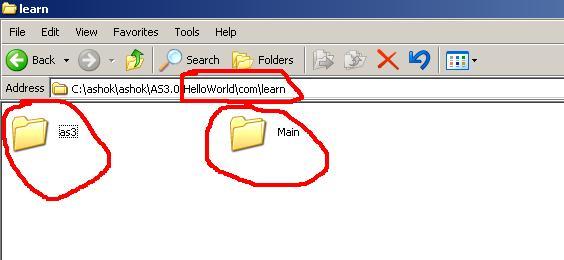
Before starting with the new HelloWorld application, we have a small home work to be done initially. Create a new folder in a location and with name of your convenience and inside the folder you created just now, create a new folder named "Hello World". Once that is done then navigate inside the created folder and create a subfolder named "com". Inside "com" create another subfolder named "learn". Don't get angry with me but for the one final time create two folders named "as3" and "Main" as subfolder's inside the last created folder "learn".
Now if look at your current screen it should look like the one below(except for the three red circles which was made by me using mspaint to show the path and the two subfolders created for reference).
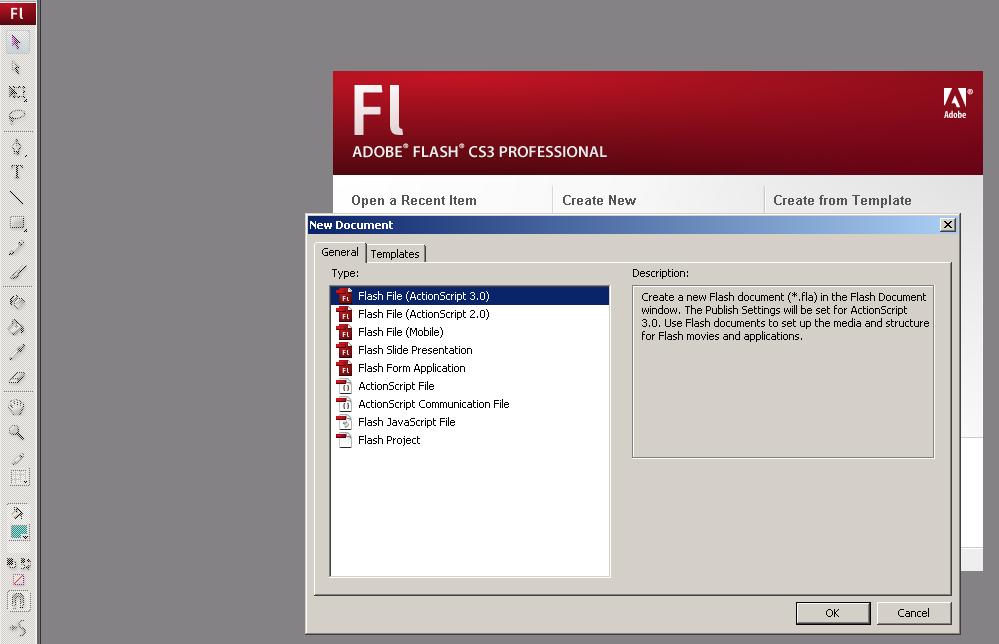
Thats it for now and run the Flash IDE, after it has initialized completely do select "File" -> "New". From the options select "Flash File(ActionScript 3.0)" and click "OK". The screenshot is attached below for your reference.
After creating the Actionscript 3.0 type File click on the stage and create two objects as follows
1) Dynamic TextField - instance name "$dyn".
2) Simple Button - instance name "$btn" .
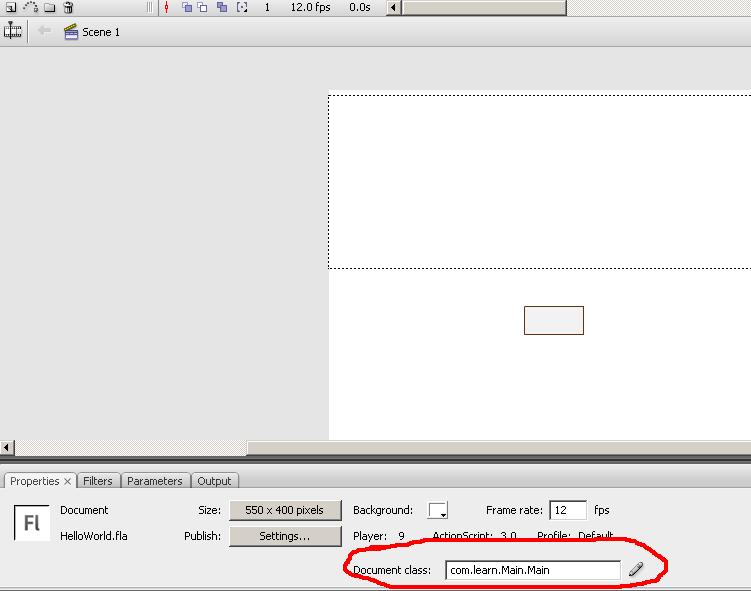
Now click an stage area and open the properties panel(shortcut ctrl+f3). Now the property panel is open type com.learn.Main.Main in the Document Class field. See screenshot below.
Do not try to compile for we have to add the class files now. Still you wish to know what could have changed in the error messages go ahead and try it.
After all the above steps are completed hit Ctrl+N or create a new ActionScript File from the New Document window just like the way you created a new flash file sometime before but select ActionScript File (which would be probably the sixth item). Upon successfully opening an empty ActionScript file copy and paste the code below. see screenshots first.

package com.learn.Main
{
import flash.display.MovieClip;
import flash.text.TextField;
import flash.events.MouseEvent;
import flash.display.SimpleButton;
import com.learn.as3.HelloWorld;
public class Main extends MovieClip
{
private var hWorld:HelloWorld;
public function Main()
{
init();
}
private function init():void
{
trace('I N I T');
hWorld = new HelloWorld();
$dyn.text = hWorld.sayHello();
$btn.addEventListener(MouseEvent.CLICK,releaseAction);
}
private function releaseAction(e:MouseEvent):void
{
trace('onRelease : '+e.target.name);
}}
}
Finished pasting the above code ???? Now save it in the name "Main" under the folder com->learn->Main->Main.as. What we have done now is an ActionScript class has been associated with the FlashDocument itself. have you ever remembered this being possible in the previous versions ? what we have been doing earlier was that we wrote an class file and associated the main timeline as an parameter to AS2.0 class file. But now the Flash File itself can be associated with an Custom Class File. isn't this great ?
We are almost 70% done for the tutorial to be completed. The one final thing you have to do is create another ActionScript Class just like the way you created Main.as and paste the below code in that. Save the file under the folder com->learn->as3 with the name HelloWorld.as.
package com.learn.as3
{
public class HelloWorld
{
public function HelloWorld()
{
}
public function sayHello():String
{
return "Hello World";
}
}
}
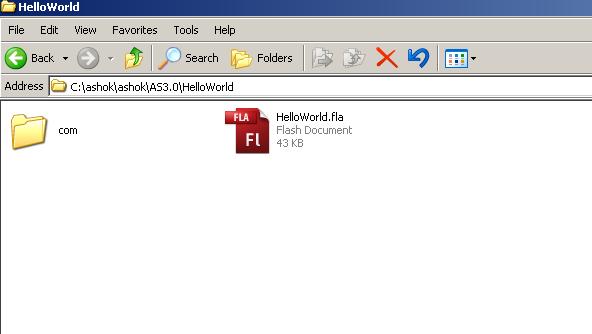
Done pasting the second code? Now get back to the fla file and save it under the folder Hello World with the file named as "HelloWorld.fla". Now there should be a flash source file "HelloWorld.fla"(you will see file name extension ".fla" only if you have enabled show extensions setting in windows) and a folder (which we created initially) named "com" inside the folder HelloWorld. To avoid confusion and for having a clarity see screenshot below.
Now that everything is in place and the only step remaining is to compile the flash file we have created. Doing this will generate the swf file named "HelloWorld.swf " without any errors if you had copied and pasted the code and saved them with the appropriate names and at correct location specified above. The output of the swf is attached as a screenshot below.
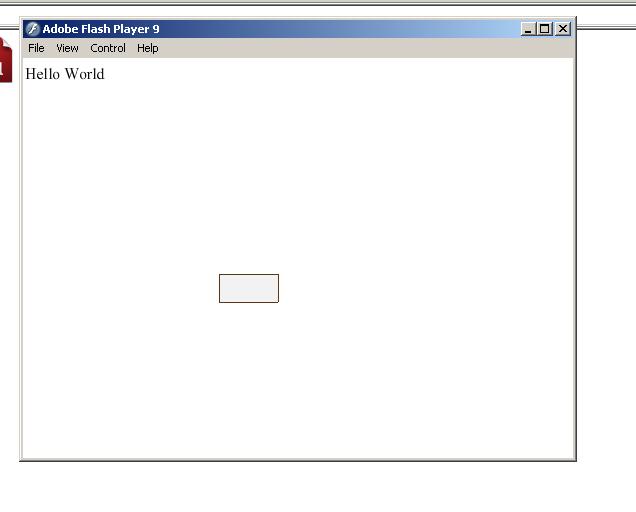
But still if you wish to know what happens when the button is clicked you need to either run it from the Flash IDE or have some good logger tools like afterthought or Flash Tracer plugin for firefox.
Thats it for now and we will in less time see what the chunk of code written for this tutorial does.
Regards,
Ashok Srinivasan.
